Welcome back. You were on step .
-
Step 1: Make sure it’s really lost or broken
Lost on its own? The location on the map is the tracker’s, so it can lead you to it while its battery lasts. Not working? Charge it and restart it first, because a tracker that won’t turn on often just needs charging.
-
Step 2: Ask support to remove the old tracker
Your account has room for one tracker, so the old one has to come off before you can pair a new one. Contact support from the email address you use for Waggi, and tell us whether it’s lost or broken. We’ll let you know when it’s removed.
TipIf you can, include the tracker’s ID. While the old tracker is still on your account, it’s shown in Settings › Tracker Settings.
-
Step 3: Sign out and back in, then tap Pair Device
Once we’ve confirmed, go to Settings, tap Logout at the bottom, then Logout again to confirm. Sign in again with the same email. The Home screen now shows Pair your tracker. Tap Pair Device.
Photo needed: The Home screen with the Pair your tracker card (picture of the tracker, “Connect a Waggi tracker to follow [Name] live on the map…”) and the Pair Device buttonThere’s no Pair your tracker card?
The old tracker is still on your account. Check with support that it’s been removed, then sign out and back in again.
-
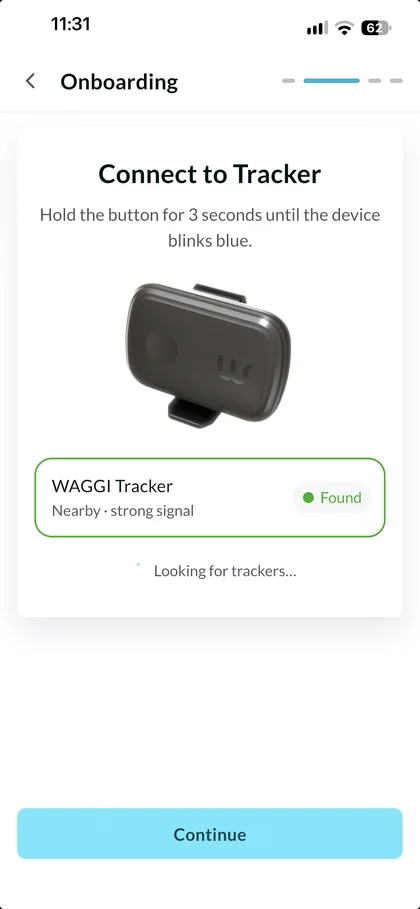
Step 4: Pair the new tracker
Keep the new tracker within a metre of your phone. It appears as WAGGI Tracker, marked Found. If there’s more than one, tap yours, then tap Continue. When you see Connection successful, tap Done, and you’re back on Home.
TipYour dog’s profile, saved walks, virtual fences and alert settings stay as they were, and your fences are sent to the new tracker. Health starts again from the day you pair it, so steps, calories and sleep from the old tracker no longer show.
It says the tracker is registered with another account?
That tracker has been set up before, for example if it’s second-hand or it’s your old one. Contact support and we’ll help. Don’t use Factory Reset.
Frequently asked questions
Can I add a second tracker to my account?
Not at the moment. Each Waggi account has one dog and one tracker. To swap to a new tracker, for example if yours is lost or broken, contact support to remove the old one, then pair the new one from the Home screen.
Will I lose my dog’s history if I replace the tracker?
Your dog’s profile, saved walks, virtual fences and alert settings stay on your account. Health starts again from the day you pair the new tracker, so steps, calories and sleep recorded by the old one no longer show there.
Can I give or sell my tracker to someone else?
Not from the app yet. A tracker stays set up for your account, and the new owner can’t pair it: their app says it’s already registered with another account. Contact support before you hand it over, and we’ll help. Deleting your account doesn’t free the tracker on its own.