At a glance
The Food Portion Calculator works out how many calories your dog needs each day and how many meals to split them into. You’ll find it on the Profile tab, under your dog’s tracker.
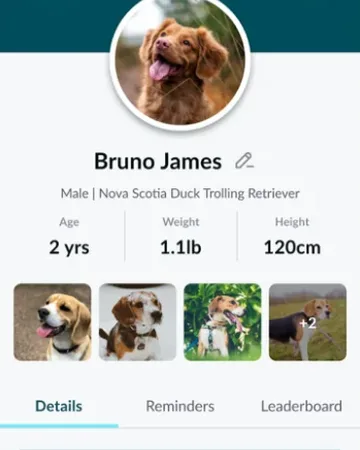
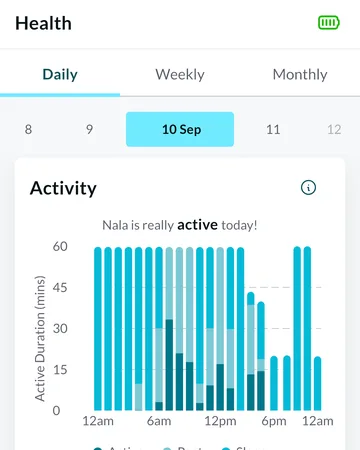
It uses your dog’s weight, age and neutered status from their profile, plus how active they’ve been over the last 15 days, from the steps their tracker counted. So it needs a paired tracker, and it’s worth running again when your dog’s weight or routine changes.
Running the calculator
On the Profile tab, scroll to the Food Portion Calculator card and tap Let’s start. If you’ve used it before, tap the pencil on the card instead. It takes four steps:
- Type of feed
- Under “Which type of feed does <your dog> prefer?”, pick the type of food they eat, then tap Next.
- Brand
- Tap Search Food Brands, type the brand’s name and tap it in the list. Not listed? Tap Add New brand to add it.
- Calories per serving
- Type the calories in one serving of their food, then tap Calculate.
- Your dog’s portion
- The recommendation appears. Tap Save to close it and see it on the card, or Start Again to go back to the beginning.
Reading the recommendation
Under “Here’s the recommended amount of food you should feed your dog per day.” you’ll see four boxes. The same boxes stay on the Profile tab until you run the calculator again.
- Brand
- The food brand you chose.
- Amount
- The calories per serving you typed in for their food. It isn’t a weight of food to give.
- Recommended
- How many calories (kcal) your dog needs in a day.
- No. of times
- How many meals to split that into each day: three for dogs under a year old, two for older dogs.
What sets the amount
The recommendation comes from your dog’s profile and their tracker. It’s a guide: if you’re not sure how much to feed, or your dog has special dietary needs, check with your vet.
- Weight
- The main thing: a heavier dog needs more calories. Keep it up to date on Pet Details.
- Age
- Worked out from their birthday. Puppies need more for their size, and dogs aged 7 and over a little less.
- Neutered or spayed
- Neutered and spayed dogs need a little less. Set it with the Neutered/Spayed tick box on Pet Details.
- How active they’ve been
- The steps their tracker counted over the last 15 days. Very active dogs get a bit more, less active dogs a bit less.
- What doesn’t change it
- Breed, body condition score, the type of feed, the brand and the calories per serving. The brand and calories are saved with the result so you can see them.
Different situations
- It says “Device not found”
- The calculator needs a tracker paired with your account, because it uses your dog’s steps. Pair your tracker, then run it again.
- It says “Weight is required”
- Your dog’s profile has no weight. On the Profile tab, tap the pencil next to their name, add their Weight, tap Save, then run the calculator again.
- Your dog’s brand isn’t in the list
- Type the full name in Search Food Brands, then tap Add New brand. If it says “Food brand already exists”, it’s already there: clear the search, type part of the name and look again.
- It says “Please select a brand.” or “Calories can not be empty”
- Choose a brand and type the calories per serving before you tap Calculate.
- You’ve changed your dog’s weight
- The recommendation doesn’t update by itself. Tap the pencil on the Food Portion Calculator card and go through it again.
- The tracker is new, or your dog hasn’t worn it much
- With few steps counted, the calculator treats your dog as less active, so the amount can be lower. Run it again after a few full days of wearing the tracker.
Try it out
Frequently asked questions
Using the calculator
How do I work out how much to feed my dog?
Use the Food Portion Calculator on the Profile tab. Tap Let’s start, pick the type of feed and your dog’s food brand, type the calories per serving, then tap Calculate. It shows how many calories your dog needs a day and how many meals to split them into. If you’re not sure how much to feed, check with your vet.
How do I run the Food Portion Calculator again?
Tap the pencil on the Food Portion Calculator card on the Profile tab. It starts from the beginning, and the new result replaces the old one when you tap Calculate.
Why hasn’t the food portion changed after I updated my dog’s weight?
The recommendation is worked out when you run the calculator, so it doesn’t update by itself. After a weight change, tap the pencil on the Food Portion Calculator card and go through it again.
Does it tell me how many grams to feed?
No. It shows how many calories (kcal) your dog needs a day and how many meals to split them into. The Amount box shows the calories per serving you typed in, not a weight of food. If you’re not sure how much that is, check with your vet.
Does the brand or type of food change the amount?
No. The amount comes from your dog’s weight, age, neutered status and how active they’ve been. The brand and calories per serving you enter are saved with the result so you can see them, but they don’t change the recommendation.
How the amount is worked out
What does the Food Portion Calculator use to work out the amount?
Your dog’s weight, their age from their birthday, whether they’re neutered or spayed, and how active they’ve been over the last 15 days, from the steps their tracker counted. Breed and body condition score don’t change it.
Why does the Food Portion Calculator need a tracker?
It uses the steps your dog’s tracker counted over the last 15 days to see how active they are. Without a tracker paired with your account, it says “Device not found”.
Does my dog’s body condition score change their food portion?
Not at the moment. It’s saved with your dog’s profile, but the calculator doesn’t use it.