At a glance
Reminders aren’t in the app yet. You’ll see a Reminders tab on your dog’s profile, and for now it says “Coming soon!”.
In the meantime, walks and notifications already keep you on top of your dog’s day: record walks to see how active they’ve been, and switch on the alerts you want.
Where to find Reminders
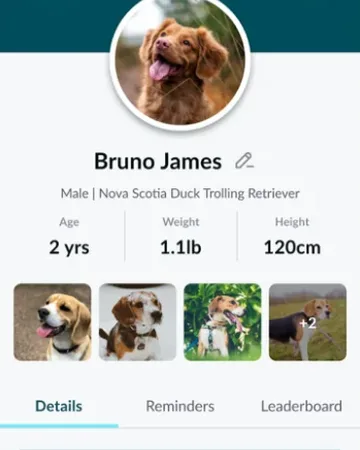
Open the Profile tab, the last tab in the app. Below your dog’s details there are three tabs: Details, Reminders and Leaderboard. Tap Reminders: for now it says “Coming soon!”.
- Coming soon!
- What the Reminders tab shows until reminders are ready. There’s nothing to set up yet.
What you can use for now
These are in the app today and help you keep track of your dog’s routine.
- Walks
- Record each walk to see its time, distance, steps and calories, and look back at your dog’s week and month.
- Notifications
- Get an alert when your dog leaves your virtual fences or comes back, when the tracker’s battery is low, and when there’s a tracker update. Turn each one on in Settings, then Notifications.
- Pet profile
- Keep your dog’s weight and details up to date, so calories and food portions stay right.
Try it out
Frequently asked questions
Reminders
Can Waggi remind me about medication?
Not yet. Reminders are coming soon, and the Reminders tab on your dog’s profile says “Coming soon!” for now. Until then, use your phone’s own reminders or calendar for medication and vet visits.