At a glance
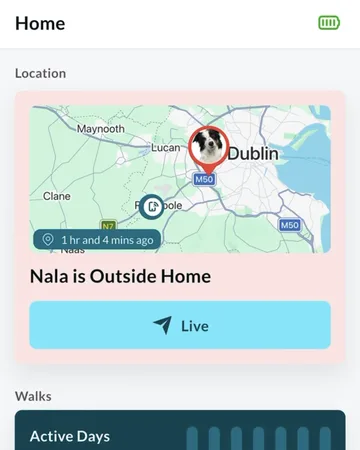
The Location tab shows where your dog is on a map, and how long ago that was checked. The tracker works out its own position and sends it over its own mobile connection, so you can see your dog from anywhere, whether you’re with them or not.
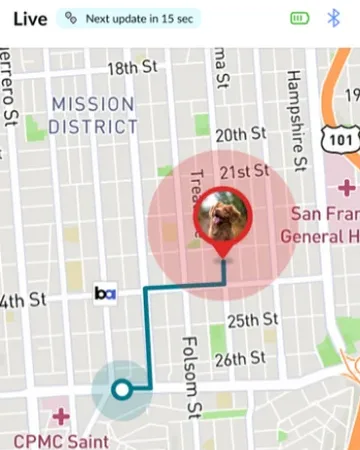
Most of the time you’ll glance at it for peace of mind. If your dog ever goes missing, Live mode follows them minute by minute and gives you directions to them.
How the tracker finds your dog
The tracker first looks at the Wi-Fi networks around it, which works well indoors and in built-up areas. When Wi-Fi isn’t precise enough, it uses GPS satellites, which work best under open sky.
It then sends its location to the app over its own mobile connection. Your phone doesn’t need to be nearby.
It checks in regularly through the day, and sooner when your dog is on the move. While your dog is resting there’s less to report, so updates are further apart.
What you see on the map
Open the Location tab to see your dog on the map.
On the screen
- Your dog’s pin
- Where the tracker last placed your dog. It changes colour when your dog is outside your virtual fences.
- The circle
- How precise the location is: your dog is somewhere inside it. The smaller the circle, the more precise the location.
- Updated time
- Next to Location: how long ago the tracker last sent its position, for example “12 minutes ago”.
- Map settings
- Switch between Standard, Satellite and Open Street maps, and show or hide your virtual fences.
- Live
- Starts Live mode, for minute-by-minute updates.
Live mode
Live mode is for when you need to find your dog now. It wakes the tracker, which can take up to a minute, then updates its location about once a minute for as long as Live mode is on.
Choose Walking, Driving, Cycling or Train to see a route to your dog, with the distance and how long it’ll take. The route updates as either of you moves.
Because it checks so often, Live mode uses much more of the tracker’s battery. Turn it off once you’ve found your dog. It also ends a few minutes after you close the app.
When Live mode isn’t available
- Your dog is inside a virtual fence
- They’re somewhere you’ve marked as safe, so there’s nothing to chase.
- You’re recording a walk
- Stop the walk first: the two can’t run together.
- Your phone’s location is off
- Live mode needs your phone’s location, set to Always and Precise, to show the route.
Different situations
- Your dog is at home
- Nearby Wi-Fi gives a precise location, even indoors.
- Your dog is out in the open
- GPS takes over, and works best under open sky.
- Your dog is asleep or resting
- Updates are further apart, so the updated time grows. That’s expected: there’s nothing new to report.
- There’s no mobile coverage where your dog is
- The tracker can’t send its location until it’s back in range. The map keeps the last location and its time.
- You’re with your dog and Waggi is open
- Connected over Bluetooth, your phone can fill in your dog’s location when the tracker hasn’t sent one for a while, for example indoors. See Connection, under Knowing your tracker.
- The tracker’s battery is flat
- The map shows the last location it sent. Charge the tracker to get updates again.
- Your dog leaves a virtual fence
- Their pin changes colour, and you get an alert if Escape Alerts are on.
- Your dog is missing
- Follow “What to do the moment your dog goes missing”, under Troubleshooting: check where they were last, then tap Live and follow the route to them.
- Live mode says “Tracker is currently unreachable”
- The tracker didn’t answer within three minutes. Check it’s charged and try again. Without mobile coverage it can’t answer until it’s back in range.
Try it out
Frequently asked questions
The map
What does the time next to Location mean?
How long ago the tracker last sent its location, for example “12 minutes ago”.
What’s the circle around my dog?
How precise the location is: your dog is somewhere inside it. A smaller circle means a more precise location.
Why did my dog’s pin change colour?
Your dog is outside your virtual fences.
Can I change how the map looks?
Yes. Tap the map settings button and choose Standard, Satellite or Open Street. You can also hide your virtual fences there.
Why does the app need precise location?
To show you and your dog on the same map, give you directions in Live mode, and place your virtual fences accurately.
How location works
How does the tracker know where my dog is?
It looks at the Wi-Fi networks around it first, and uses GPS satellites when Wi-Fi isn’t precise enough.
Does my phone need to be near the tracker?
No. The tracker has its own mobile connection, so it sends its location to the app wherever you are.
How often does the location update?
Regularly through the day, and sooner when your dog is on the move. When you need minute-by-minute updates, use Live mode.
Why is my dog’s location out of date?
Updates are further apart while your dog is resting. If it stays old, check the tracker is charged and has mobile coverage, or follow “Location isn’t updating”, under Troubleshooting.
Does it work indoors?
Usually, yes: nearby Wi-Fi networks help indoors. GPS works best under open sky.
Live mode
How often does Live mode update?
About once a minute, for as long as Live mode is on.
Why can’t I turn on Live mode?
It isn’t available while your dog is inside a virtual fence or while you’re recording a walk. Your phone’s GPS also needs to be on. If it says Live Location Unavailable, the tracker hasn’t noticed your dog moving yet. Try again once they’re on the move.
Does Live mode use more battery?
Yes. The tracker checks its location far more often, so turn Live mode off once you’ve found your dog. The app warns you if the tracker’s battery is low.
It says “Tracker is currently unreachable”. What now?
The tracker didn’t answer within three minutes. Check it’s charged and try again. If your dog is somewhere without mobile coverage, it can’t answer until it’s back in range.
When does Live mode stop?
When you stop it. It also ends a few minutes after you close the app.