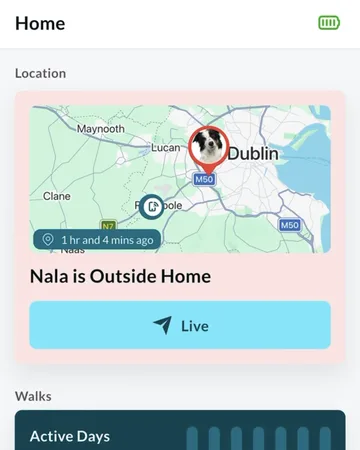
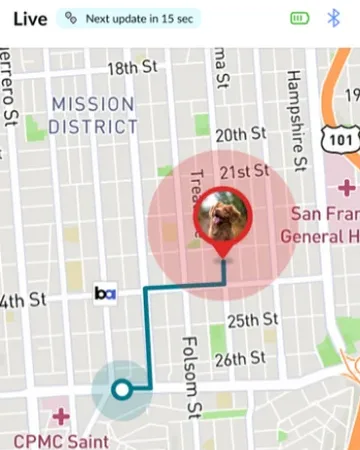
At a glance
Waggi can tell you when your dog leaves your virtual fences and comes back, when the tracker’s battery is running low, and when there’s an update for the tracker.
Each has its own switch in the app, under Settings, then Notifications. Check each alert you want is switched on there, and that your phone allows notifications from Waggi.
The Notifications screen
Open Settings, then Notifications. You can also get there during setup, from Notifications on the Permission screen. There are three switches, in two groups.
- Escape Alerts
- Under Location. Tells you when your dog leaves your virtual fences, and when they’re back inside.
- Battery
- Under Device. Tells you when the tracker’s battery is running low.
- Firmware updates
- Under Device. Tells you when there’s an update for the tracker’s software.
Turning alerts on
Check each alert you want is switched on. Your choices are saved to your Waggi account.
If your phone isn’t allowing notifications from Waggi, all the switches show off, and tapping one asks for permission first. If you’ve said no before, the app asks you to allow it in your phone’s settings: tap Open Settings.
Good to know
- Phone notifications
- Your phone asks whether Waggi can send notifications when you first open the app. You can change it later in your phone’s settings.
- Who gets alerts
- Every phone signed in to your Waggi account, as long as it allows notifications from Waggi. Family members can’t get them on their own accounts yet.
- Signing out
- A phone you sign out of stops getting alerts.
What each alert says
These are the alerts you can get, and what sets each one off.
Escape Alerts
- “Your pet’s outside the virtual fence.”
- Then “Please check and ensure your pet is safe.” When your dog is outside all your virtual fences that are switched on. Tap it to open the Location tab.
- “Your pet’s inside the virtual fence.”
- With the same second line, when they’re back inside one of them.
- More about these
- Virtual fences, under Knowing your tracker, explains when these come.
Battery
- “Tracker is almost out of battery.”
- Then “Please recharge as soon as possible.” When the battery drops below 15%.
- “Tracker is out of battery.”
- Then “Please recharge to continue.” When it’s close to empty. Neither comes while the tracker is charging.
- More about these
- Battery and charging, under Knowing your tracker, explains when these come.
Firmware updates
- “Firmware Update”
- Then “Please update the device firmware for better functionality”. When a new version of the tracker’s software is ready. You get an email about it too. Install it from Settings, then Tracker Settings.
In Live mode
- “Tracker battery is low”
- Then “Please recharge soon.” The app shows this while Live mode is running and the battery is below 15%, even with Battery switched off.
When the app is open
With Waggi open on your screen, a fence or update alert shows as a banner at the top of the app instead of in your phone’s notifications. It closes after a few seconds, or tap the cross. Tap a fence alert to open the Location tab.
Battery alerts go to your phone’s notifications, even with the app open. When the app is closed or in the background, every alert does.
Different situations
- You’re not getting any alerts
- Check the alert is switched on in Settings › Notifications, and that your phone allows notifications from Waggi. See Troubleshooting, under Alerts and notifications.
- An escape alert came late
- While your dog is resting, the tracker checks in less often to save battery, so the alert comes when it next sends a location. Once they’re moving it checks in sooner. To follow them now, use Live mode.
- Your dog left but no escape alert came
- Fence alerts wait for a precise location, and the tracker needs charge and mobile coverage to send one. With several fences, the alert comes only once your dog is outside all of them.
- You’re taking your dog out
- Expect an alert as you leave and another when you’re back. Turn the fence off with Activate virtual fence first if you’d rather not get them.
- The tracker is on its charging pad
- No battery alerts come while it’s charging.
- You want fewer alerts
- Switch off the ones you don’t need in Settings › Notifications. For one fence, turn it off with Activate virtual fence instead.
Frequently asked questions
Choosing your alerts
Where are the notification settings?
In the app, go to Settings, then Notifications. There are three switches: Escape Alerts, Battery and Firmware updates.
How do I make sure I get alerts?
Go to Settings, then Notifications, and check each alert you want is switched on. Then check your phone allows notifications from Waggi.
How do I turn alerts on or off?
Go to Settings, then Notifications, and tap the switch for each alert. To pause alerts for one fence, turn the fence off with Activate virtual fence instead. To stop every alert on one phone, turn off notifications for Waggi in the phone’s settings.
Why do all the switches show off?
Your phone isn’t allowing notifications from Waggi. Tap a switch and allow notifications when asked. If you’ve said no before, tap Open Settings and turn on notifications for Waggi there.
The alerts
What alerts does Waggi send?
Escape Alerts when your dog leaves your virtual fences and when they’re back, Battery alerts when the tracker is running low, and Firmware updates when there’s an update for the tracker. In Live mode, the app also tells you if the battery is low.
Will I get an alert when my dog comes back?
Yes, with Escape Alerts on: “Your pet’s inside the virtual fence.” It comes when your dog is back inside one of your fences.
What is the Firmware updates alert?
It tells you when there’s a new version of the tracker’s software, by notification and by email. Install it from Settings, then Tracker Settings.
Who gets Waggi alerts?
Every phone signed in to your Waggi account, as long as it allows notifications from Waggi. Family members can’t get them on their own accounts yet.
Why did an alert show inside the app?
When Waggi is open on your screen, fence and update alerts show as a banner at the top of the app instead of in your phone’s notifications. Battery alerts go to your phone’s notifications, even with the app open.